Get started
The way we do science is changing rapidly, but it is more important than ever to keep science open.
open-science is a framework for doing research in the open (see this blog post for the philosophy behind this):
- A complete research record. How the methods were developed, the results, the approaches that failed, and the source code, in a public repository and on a project website, with the data archived on Zenodo with a DOI.
- You decide what goes public, and when. You work in a private repository and can mark any task, file or dataset as private. Nothing is released until you choose to publish. Each release contains only the files you allow, is checked for private material and secrets, and needs your approval.
- Context management for agentic work. Agents keep a short context file for the project and for each task, so any new session, a collaborator or another researcher can pick up an ongoing project straight away. Optionally, agents also clear their conversation on their own and resume from that file ("session jumps"), so a long session is not resent in full on every turn or after the prompt cache expires, which reduces usage.
- Work your way. Use plain files and the
opscicommand yourself, or use the optional Claude Code and Codex plugins. The research record and publication checks are shared.
Start with the tutorial. The documentation covers each part in full, one page per component.
Install
If you use Claude Code, install the plugin and start Claude Code:
claude plugin marketplace add mhycheung/open-science
claude plugin install open-science@open-science
claude
Then type /open-science:onboard. The tutorial says what onboarding does and
gives the prompts for the next steps: starting a project, brainstorming, starting a task and
using Notion.
For Codex:
codex plugin marketplace add mhycheung/open-science
codex plugin add open-science@open-science
codex
Ask Codex to use open-science:onboard. Restart after installing components and review
their hooks with /hooks. See Claude Code and Codex for setup, shared
workflows, and the differences in session controls.
If you are not using agents, install the opsci command
(pip install "git+https://github.com/mhycheung/open-science#subdirectory=tools", see
The opsci command) and follow the pages of the components you want
(Components).
Components
The framework has three components. Use any combination; each works without the others,
except context management, which needs project management. Project management and
publishing are used through opsci and plain files; their Claude Code and Codex plugins
are optional. One more plugin, open-science, holds the onboarding skill and the dispatch skill.
| # | component | what it does | needs | pages |
|---|---|---|---|---|
| 1 | project management: the project template and the open-science-project plugin |
the layout every project is copied from (description, tasks, map, rules, citations, context files, publish settings), and skills to create a project, start tasks, keep context files under their caps, migrate an old project, take template updates and record side investigations (new-project, new-task, context-files, migrate-project, update-from-template, private-investigation) |
git, opsci |
Project template and layout, Project skills |
| 2 | context management: the open-science-context plugin, for agents |
agents keep the context files current and take over a task from them; optionally, they clear their own conversation and resume from those files ("session jumps") (context-management, continue-context, advise-with-context) |
project management (installed with it), opsci; on Claude Code, a version that runs mods (2.1.287 or later), else Claude Code inside tmux; Codex needs tmux only for session jumps |
Context management and session jumps, Working in tmux |
| 3 | publishing: opsci publish and the open-science-publish plugin |
a private and a public copy of each project; the checked, user-approved export to the public repository; the project website; Zenodo data releases (publish, zenodo-release) |
git, opsci, a GitHub account; any git repository |
Publishing and the filter, Zenodo releases |
On Claude Code, context management does its session jumps through a
Claude Code mod, from inside
Claude Code, so it needs no tmux. Mods need Claude Code 2.1.287 or later (claude update)
and are being switched on for accounts step by step; onboarding checks. Without them, the
plugin falls back to typing into the agent's tmux pane, which needs Claude Code to run inside
tmux; Working in tmux shows how to set it up, including on a cluster's compute
node. Codex needs tmux only for session jumps; see Claude Code and Codex.
Also part of the framework:
| part | what it does | pages |
|---|---|---|
opsci command |
the command-line tool behind every step, run by you or by the skills: map build, tasks, context caps, publish, site, Zenodo, notifications, Notion | The opsci command, Notifications, Notion mirror and Feed |
open-science plugin |
the onboarding skill open-science:onboard; open-science:dispatch, which starts an agent in a new tmux window when you ask |
Install, Dispatching an agent |
Optional extras
Both are in extras/ of the repository, and nothing in the three components depends on
them.
| extra | where | what | needs |
|---|---|---|---|
| personal projects page | extras/projects-page/ (no plugin) |
one page on your personal GitHub site listing your projects | a GitHub Pages site; opsci only to check the file |
| SLURM resurrection | plugin slurm-resurrect, in extras/slurm-resurrect/ |
for development on a compute node of a computing cluster that uses the SLURM scheduler: when the batch job reaches its time limit, rebuild the tmux session in a new job and resume its Claude Code and Codex sessions | a SLURM cluster, with tmux and Claude Code or Codex running inside a batch job; jq, flock, setsid, sbatch, squeue, scancel |
How a project is laid out and published
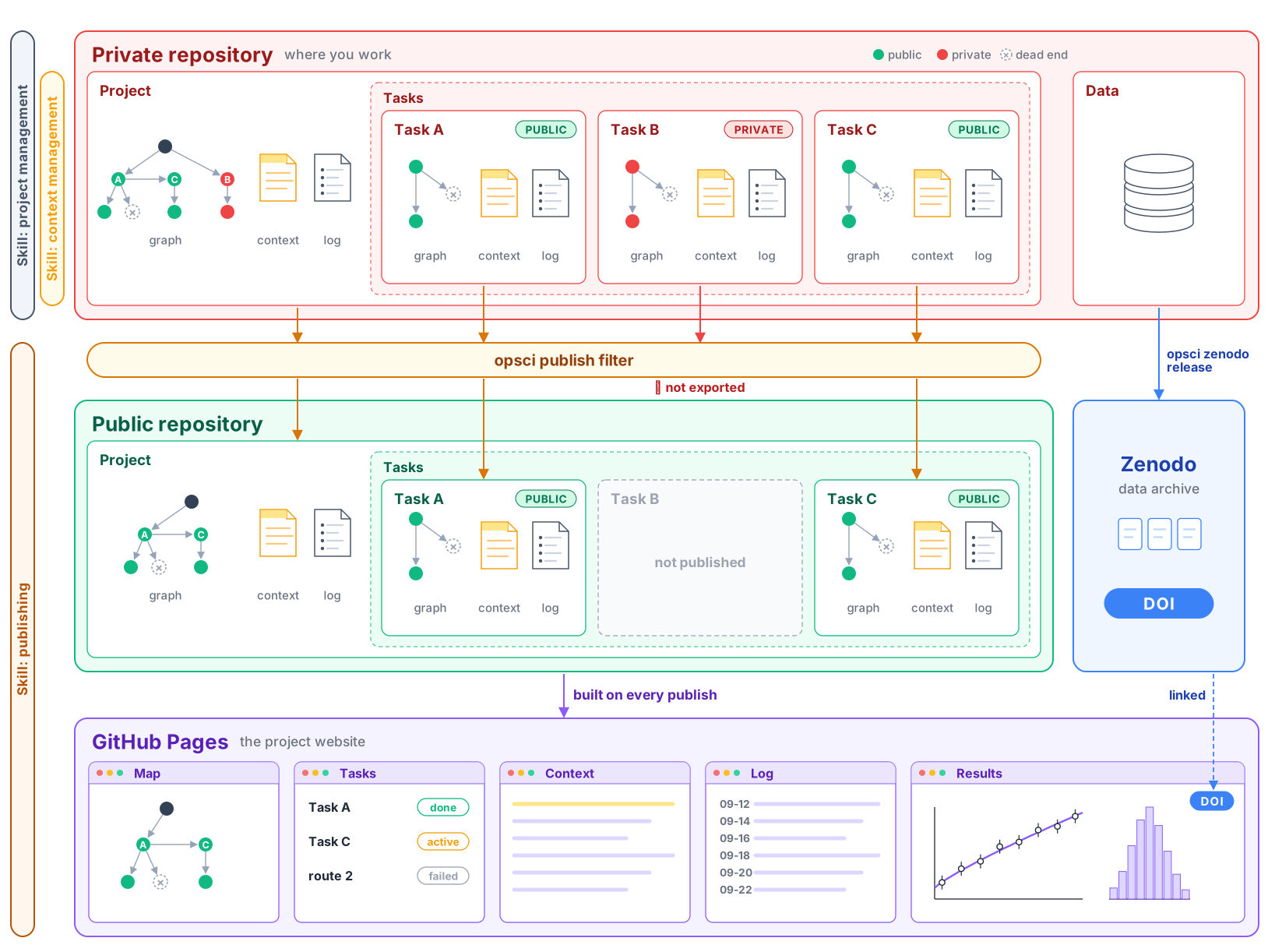
How to read the figure at the top of this page:
- Private project repository. Everything is committed here, including drafts, private
notes and failed routes. Only files listed under
includeinpublish/manifest.yamlcan leave it, and a task directory leaves only if its node header saysprivacy: public. Asoft-privatetask is left out of the release and the public map but may be mentioned by name; ahard-privatetask may not appear anywhere in the release. See Project template and layout. - The filter.
opsci publish checkexports one commit, runs every check, and writes a report. If you use an agent, it adds a review of tone and claims. Nothing is pushed until you approve that export by its id. See Publishing and the filter. - Public outputs.
opsci publish pushcopies the approved export into the public repository as a new commit, so the private history never reaches it. The public repository builds the project website on GitHub Pages. Data indata/never goes to the public repository; it can be released on Zenodo with a DOI, after you confirm the release. Your personal projects page links to all three.